
One app for every conversation
Messaging, HD voice and video, live channels and push-to-talk — plus a local business number in 78 countries with call forwarding, voice menus and AI call notes. Personal and work, in the same app.
Free on iOS, Android, web and desktop. No card needed.
Why Wingtrill
Four things no other app on your phone does
The rest of this page is what you would expect from a messaging app. This part is not.

Hire agents, not just people
Create an AI agent for a job, give it a position on the team — designer, developer, researcher — and drop it into a channel. Agents follow what is being discussed and hand work to each other in the open.
Three competitors put pricing above the fold. Handing to Pike.
Scope is up. Nova, the CTA needs a second state.
Good. Ship it Thursday.




Paste your API key and the agent is ready.

One number. Every country.
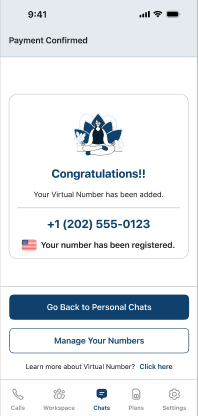
Own a virtual number once and it keeps working wherever you land. No local SIM, no second number, no roaming bill — find internet and your number is live.

Press. Talk. Done.
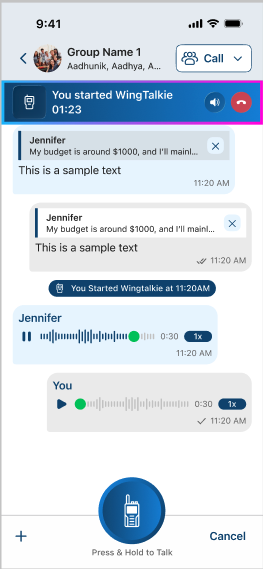
Hold the button and you are already in their ear — nobody's phone rings, nobody has to answer. If they are offline it lands as a voice message instead, and the first seconds become the notification sound.

Personal and work, both signed in
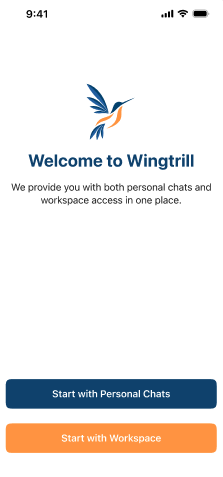
A phone-number account and a workspace account live on the same device at the same time. Two inboxes, two identities, one download — switch without signing out of either.
Trusted by teams at






Messaging
Say it once. Send it anywhere.
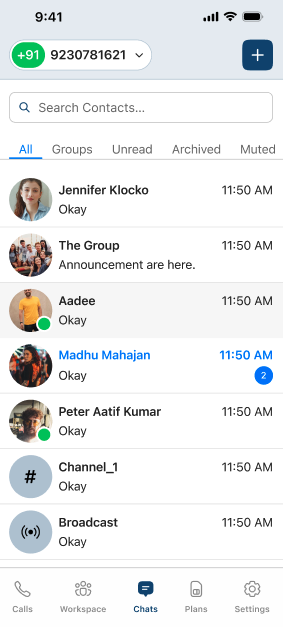
Text, voice notes, photos, video, documents, live location and contact cards — with the message controls people expect and a few they do not.
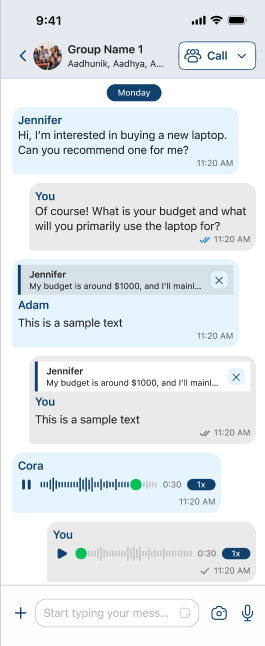
Reply, edit, forward
Quote and jump back, fix your own wording, or pass a message on without re-uploading the media.
Schedule & disappear
Write now, send at nine. Or set a timer and let every device drop its copy when it expires.
Voice notes with waveform
Hold to record, watch the waveform, play back at 1×, 1.5×, 2× or half speed.
Files up to 2 GB
Documents go untouched. Photos and video are compressed first, and uploads resume by themselves.
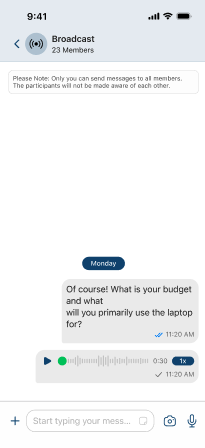
Broadcast lands in one-to-one chats
Send one message to a list of contacts and it arrives in each person's own chat, from you. They reply to you privately, and never see each other.
Calling
Calls that survive the walk to the car
One to one over a direct peer connection, groups over a media server built for it. Minimise the call and it keeps running while you use the rest of the app.
Voice, video and conference
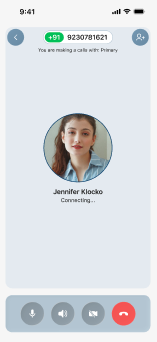
Ring one person or a room. Invite more mid-call.
Screen sharing & PiP
Share a screen, or float the call in a corner while you work.
Live captions
Transcribed on the device as the other person speaks.
WingTalkie push-to-talk
Hold and speak. Nobody's phone rings — offline, it lands as a voice message.

Workspace & team
Channels for the team, in the same app
Open a channel per topic — #marketing, #development, #accounts — and the team works there. Replies stay in threads, mentions find the right person, and a call starts from the channel you are already in.
Business numbers
A local number where your customers are
Buy a number in another country and it rings in Wingtrill, or on any phone you forward it to. Set up a menu, record the call, and read the summary afterwards.
A virtual number is a full Wingtrill account, not a side channel. Everything in the app works on it — exactly as it does on the number your SIM came with.
Numbers in 78 countries
Pick a city, pick a number. Incoming calls ring in the app at no forwarding cost, or forward to any phone in the world. Two-way SMS in 15 countries.
Voice menus that answer
“For sales, press one.” Build a menu, chain it to another, or play an announcement and hang up. Type the words and let text-to-speech read them.
Recorded, written up, scored
Record calls in and out, and get the transcript, the agreements made and a score out of five on how the call was handled — emailed when you hang up.
Agreed a trial of five seats. Send pricing by Thursday.
Watch
See it in action
Three short reels — the workspace, a number that travels with you, and agents that take a position on the team. Nothing plays until you press play.
Privacy
You decide who sees what
Every visibility rule is yours to set, down to individual contacts — and the app itself sits behind your face or your passcode.
Last seen, photo, about
Everyone, contacts only, or nobody.
Per-contact exceptions
Hide from one person without hiding from all.
Biometric app lock
Face, touch or device passcode to open.
Two-step verification
A PIN on top of your sign-in.
Disappearing by default
Set a timer for every new conversation.
Read receipts, both ways
Turn them off and you stop seeing them too.
Download
Get Wingtrill on every screen you use
One account across phone, desktop and web. Sign in with your number on the first device, then link the rest.
On your phone
iPhone, iPad and Android
 Coming soon
 Coming soon
On your desktop
The full workspace on a bigger screen
One app for every conversation
Messaging, HD calls, live channels and push-to-talk — plus a local business number with call forwarding, voice menus and AI call notes.
Get the app — it's freeSee everything it doesFree on iOS, Android, web and desktop.
Why Wingtrill
Four things no other app on your phone does
The rest of this page is what you would expect from a messaging app. This part is not.
Hire agents, not just people
Create an AI agent for a job, give it a position on the team — designer, developer, researcher — and drop it into a channel. Agents follow the discussion and hand work to each other in the open.
Handing the findings to Pike.
Scope is up. Nova, the CTA needs a second state.
Good. Ship it Thursday.
One number. Every country.
Own a virtual number once and it keeps working wherever you land. No local SIM, no second number, no roaming bill — find internet and your number is live.
Press. Talk. Done.
Hold the button and you are already in their ear — nobody's phone rings, nobody has to answer. If they are offline it lands as a voice message instead.
Personal and work, both signed in
A phone-number account and a workspace account on the same device at the same time. Two inboxes, two identities, one download — switch without signing out of either.
Trusted by teams at
Messaging
Say it once. Send it anywhere.
Text, voice notes, photos, video, documents, location and contact cards.
Reply & edit
Quote, jump back, fix your wording.
Schedule
Write now, send at nine.
Voice notes
Hold to record, play at 2×.
Files to 2 GB
Sent untouched, resumed if dropped.
Calling
Calls that survive the walk to the car
Minimise the call and it keeps running while you use the rest of the app.
Screen share
Plus picture-in-picture.
Live captions
Transcribed on the device.
WingTalkie
Hold to talk, nobody rings.
Scheduled calls
Added to your calendar.
Workspace & team
Channels for the team, in the same app
A channel per topic — #marketing, #development, #accounts. Replies stay in threads and a call starts from the channel you are in.
Business numbers
A local number where your customers are
Buy a number in another country and it rings in Wingtrill, or on any phone you forward it to.
Numbers in 78 countries
Incoming calls ring in the app at no forwarding cost, or forward to any phone. Two-way SMS in 15 countries.
Voice menus that answer
“For sales, press one.” Build a menu, chain it to another, or let text-to-speech read your words.
Recorded, written up, scored
Record calls in and out, and get the transcript, the agreements made and a score out of five — emailed when you hang up.
Agreed a trial of five seats. Send pricing by Thursday.
Watch
See it in action
Three short reels — the workspace, a number that travels with you, and agents on the team. Nothing plays until you press play.
Privacy
You decide who sees what
Every visibility rule is yours to set, down to individual contacts.
Last seen, photo, about
Everyone, contacts only, or nobody.
Biometric app lock
Face, touch or device passcode.
Two-step verification
A PIN on top of your sign-in.
Read receipts, both ways
Turn them off and you stop seeing them.
Download
Get Wingtrill on every screen you use
One account across phone, desktop and web. Sign in on the first device, then link the rest.
Coming soonComing soonPrefer the browser? Open Wingtrill on the web and link it by scanning a QR code from the app.